
What is an Amazon Transparency label?
An Amazon Transparency label authenticates an individual physical unit through a unique serial code. The Transparency program helps brand owners protect customers against counterfeit or incorrect products.
Once protection is active, applicable units sold in supported Amazon stores need a valid Amazon-issued code or an approved connected serial number. This applies to Fulfillment by Amazon (FBA) and Fulfilled by Merchant (FBM).
One unit, one unique code. A conventional product barcode identifies a product type; Transparency identifies the individual unit.
What does a Transparency label look like?
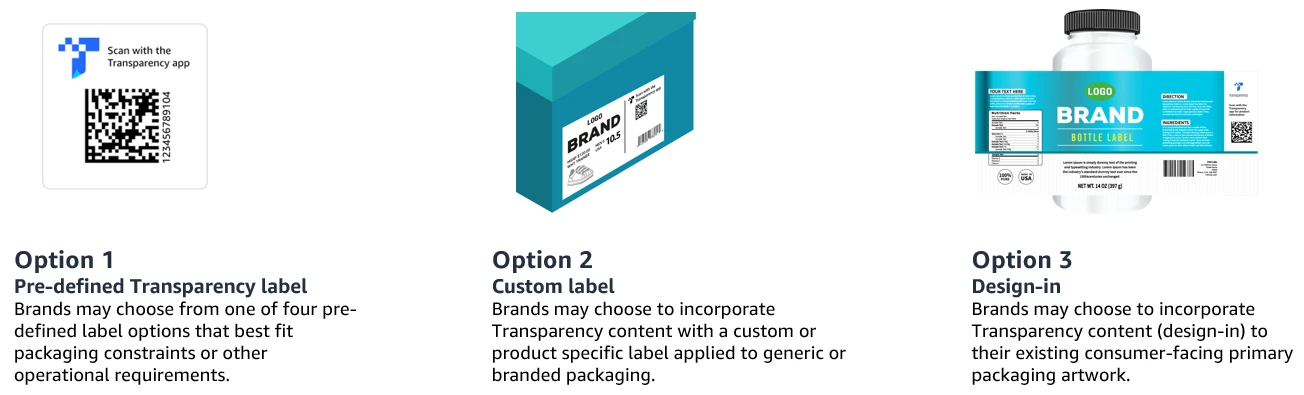
Amazon-issued labels usually have a square 2D barcode and the blue Transparency “T” logo. They may be adhesive labels or printed directly on packaging. Approved brand-issued serial codes can look different.
Amazon’s serial number guidance describes formats including identifiers beginning with AZ: or ZA:. A QR code containing a product URL does not create an authentication record.
How Transparency codes work
Imagine 10,000 identical travel mugs. They can share an ASIN and UPC, and units in the same seller’s inventory may share an FNSKU. Each enrolled mug receives its own Transparency identifier.
| Identifier | Mug A | Mug B |
|---|---|---|
| ASIN | Same listing | Same listing |
| UPC / EAN | Same manufacturer code | Same manufacturer code |
| FNSKU | May share a seller barcode | May share a seller barcode |
| Transparency | Unique code A | Unique code B |
Amazon checks whether a code is recognized and matches the enrolled product, helping detect counterfeit units and incorrect variations.
Transparency vs. FNSKU
| Feature | FNSKU | Transparency |
|---|---|---|
| Purpose | Fulfillment inventory identification | Individual-unit authentication |
| Barcode | Usually 1D | Usually 2D |
| Unique per unit? | Generally no | Yes |
| Used by | Amazon FBA workflow | Enrolled brands and Amazon |
| Required for every product? | No | Protected products only |
| Both on one package? | Yes | Yes |
UPC/EAN, FNSKU, and Transparency can coexist on one package. Authentication does not automatically replace required inventory or retail identifiers. See our FNSKU label guide for inventory labeling.
Is Transparency required for FBA?
Not for every FBA product. Once an enrolled ASIN passes Amazon’s operational performance review and protection becomes active, applicable inventory must meet the authentication requirements. Amazon scans FBA codes; FBM sellers provide codes through supported order-confirmation methods.
Resellers should check sourcing requirements before buying inventory for protected listings. Genuine merchandise can still fail checks when required codes are missing or invalid.
Printing Transparency labels
Thermal and office printers
Direct thermal printers need no ribbon, but heat and sunlight can shorten label life. Thermal transfer uses a ribbon and is often better for durable packaging. Laser or compatible inkjet printers can also use suitable adhesive sheets.
Check resolution, contrast, label stock, and barcode readability. Match the PDF page to the label size, avoid unintended scaling, and scan a few test prints before printing a full batch.
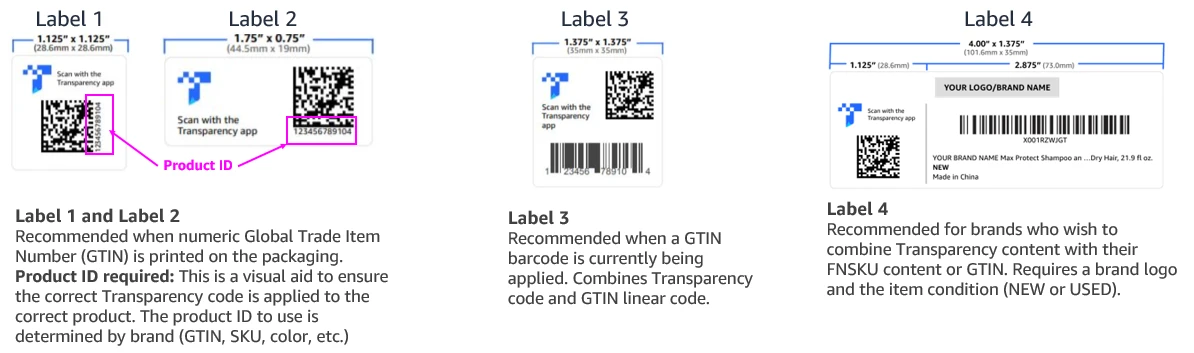
Example label sizes
An Amazon Seller Forums representative reported these minimum sizes. Confirm current specifications for your issued format; these are template examples, not one universal size.
| Template | Height × width (inches) |
|---|---|
| Type 1 | 1.125 × 1.125 |
| Type 2 | 0.75 × 1.75 |
| Type 3 | 1.375 × 1.375 |
| Type 4 | 1.375 × 4.0 |
Where should labels be applied?
Apply the code to the individual sellable unit on a flat, visible, durable surface. Avoid corners, folds, seams, curves, and textured areas. Keep every code accessible to a scanner.
Amazon’s FBA preparation guidance says Transparency labels must not cover, or be covered by, another label. Keep FNSKU and shipping stickers clear of the authentication barcode.
Can customers scan them?
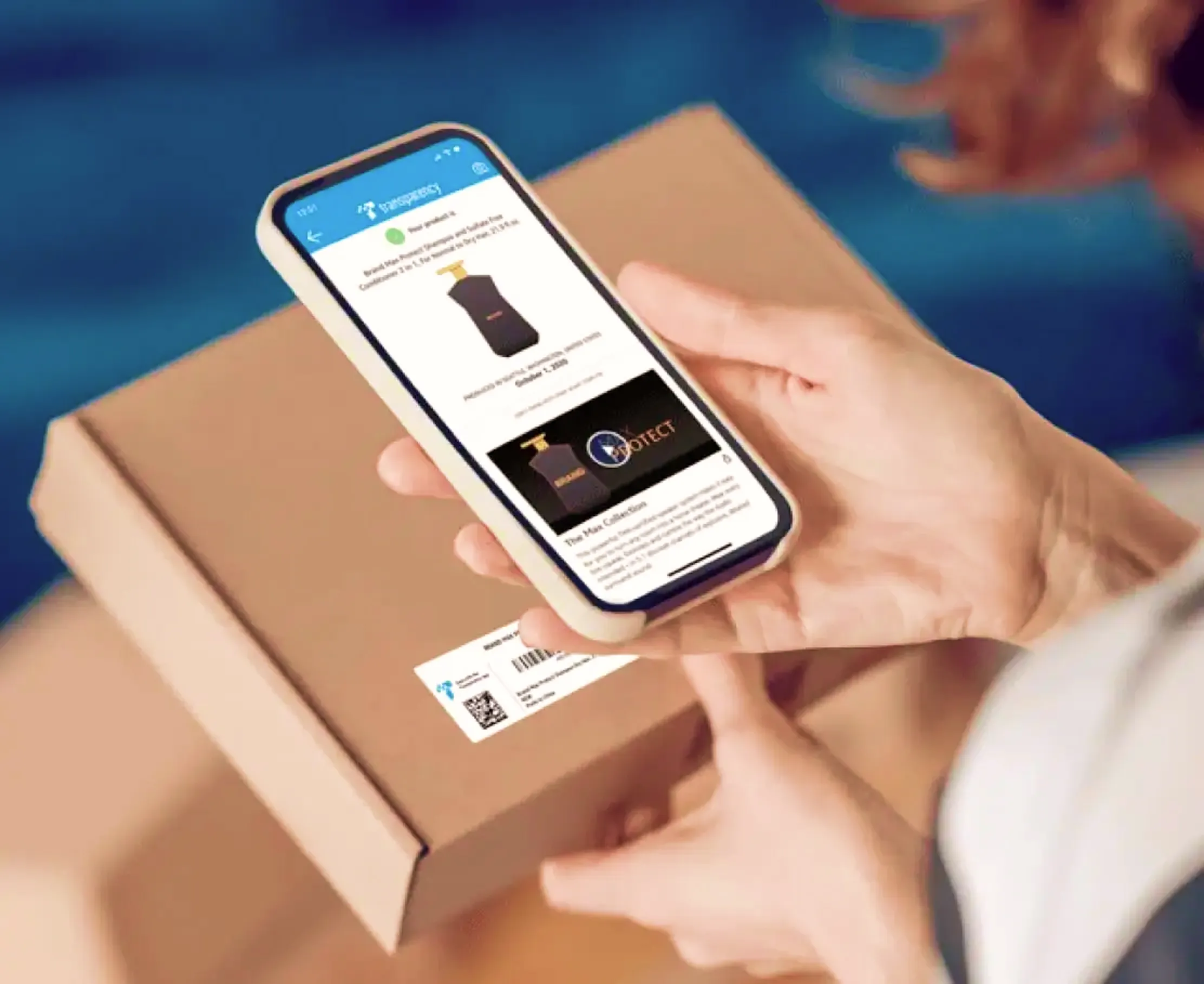
Customers can scan Amazon-issued codes with the Amazon Shopping or Transparency app to check authenticity. Brands may also share product information. A generic camera or QR reader does not necessarily provide Amazon authentication.
Amazon distinguishes the two code types: customer app verification is currently unavailable for products connected through existing brand-issued serial codes.
How much do Transparency codes cost?
Amazon’s published US pricing has no enrollment or subscription fee. Per-code rates depend on cumulative annual volume; check current terms for your geography.
| Annual cumulative codes | USD per code |
|---|---|
| 1–1,000,000 | $0.05 |
| 1,000,001–10,000,000 | $0.03 |
| 10,000,001+ | $0.01 |
At $0.05 each, 10,000 codes cost about $500 before printing, application, and handling. Annual volume resets on the account creation anniversary.
Common labeling problems
- Missing codes on protected products, or stock sourced without required codes.
- Duplicate or reused identifiers across different physical units.
- Codes applied to the wrong product or variation.
- Damaged, incorrectly scaled, or low-contrast barcodes.
- Transparency codes covered by FNSKU stickers or shipping labels.
Check code presence, product association, and successful scanning during warehouse preparation, before shipping inventory to FBA.
How Ship Toolkit can help
Use the Transparency Label Customizer for authorized label files, or our PDF tools for page layouts and print preparation. Ship Toolkit does not issue or authenticate Amazon-authorized codes.
Customize Transparency LabelsFrequently asked questions
Is Transparency the same as FNSKU?
No. FNSKU identifies fulfillment inventory; Transparency authenticates individual units.
Does every FBA product require it?
No. The requirements apply to products protected under the Transparency program.
Can I print labels myself?
Yes, using authorized codes, compatible printing methods, and the applicable label specifications.
Can I reuse one code on many units?
No. Each protected physical unit needs its own authorized unique identifier.
Can a generic QR generator produce valid codes?
No. Creating a barcode image does not create an approved authentication record.
Can UPC, FNSKU, and Transparency coexist?
Yes. They serve different purposes and can appear on the same product package.
Can customers authenticate purchases made outside Amazon?
Amazon-issued codes support app verification regardless of purchase channel. Marketplace enforcement applies to supported Amazon stores.
Does this eliminate counterfeits completely?
No. Transparency adds authentication and enforcement safeguards, but no system is perfect.
Before you ship
Serialization gives brands protection and adds handling and sourcing responsibilities for sellers and warehouse teams. Use this final check for every protected unit.
- Obtain authorized codes through Amazon or an approved serialization integration.
- Assign each code to its correct individual product unit.
- Apply labels without covering another required barcode.
- Verify that the finished label remains reliably scannable.